
If you've ever wondered how a tech guy updates their computers?
A solution that can scale. Email me at opensource3@yahoo.com for any questions, phone number at (215) 954-4908 , and to purchase support of my services for such solutions. You want to be fully updated, upgraded, and backuped each day to be safe.
It started with a bash script that connects to each computer, that then runs sudo apt update and sudo apt upgrade , while this solution is nice, it has its drawbacks, for example, sometimes a program requires answers to questions that a script doesn't handle.
My solution that has grown a bit is I've ai-assist coded / vibe coded a pyside6 gui and python3 solution that takes into account the many ways an update could run differently than the typical update / upgrade.
It's at the click of a button of a program that is proprietary built just for that reason, to update computers.
It can also update the linux kernel among a group of computers also.
Here's a gif of it.
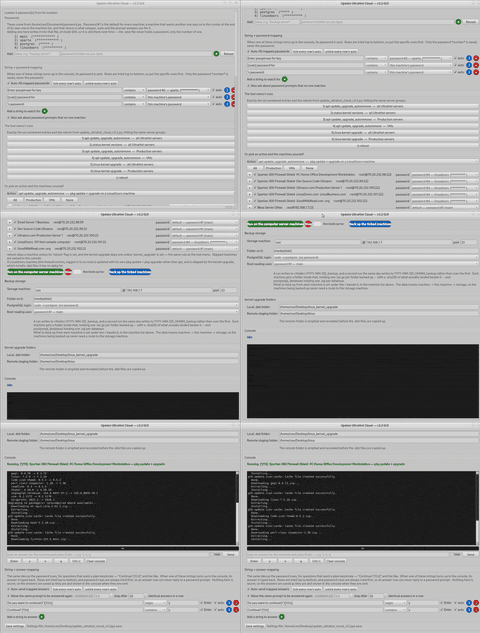
The console towards the bottom displays all the output the usual sudo apt update and sudo apt upgrade accommodate.
Here's a few ideas that the program handles.
- dynamic passwords mapping from a label to actual pwd
- dynamic string to password mapping - when one of a dynamically added strings turns up in the console, its password is sent
- a text menu of options, from running the usual update/upgrade , update linux kernel itself among a group of computers, get linux kernel versions from a list of computers, etc.
- dynamically add additional computers that are among the update / upgrade list
- because updating / upgrading is very similar to what happens when backuping up files / folders of a computer (computers are traversed, command statements are invoked, and things happen) the + before each computer listing displays when clicked / expanded a dynamic list of input boxes that correspond to files or folders for backup scenarios
- storage location area where backups occur
- linux kernel new location, and its remote staging area
- console output of the update / upgrade and backup text
- additional input for the console in situations other than a typical update / upgrade , such as entering a custom input , y , n , q , ctrl+c , and clear console
- dynamic additions of this additional of point #9. input so that when a pre-determined string an answer is typed back of a mapped console string to answer.
- and the last item is a save button to save all settings configured to a person's particular situation
This has saved countless hours each day. I hope this has stirred some ideas. I look forward to reading your blog or article of useful ways you save time, are efficient with the use of tech solutions, and so forth.
0 Comments
No comments yet. Be the first!
Leave a Comment